
Copilot inherits every permission decision your organization has ever made. That is the real project.
Key Takeaways
Copilot readiness is a data governance project wearing an AI costume.
Copilot respects existing user permissions, so a SharePoint site or file share that was quietly overshared years ago becomes searchable by conversation.
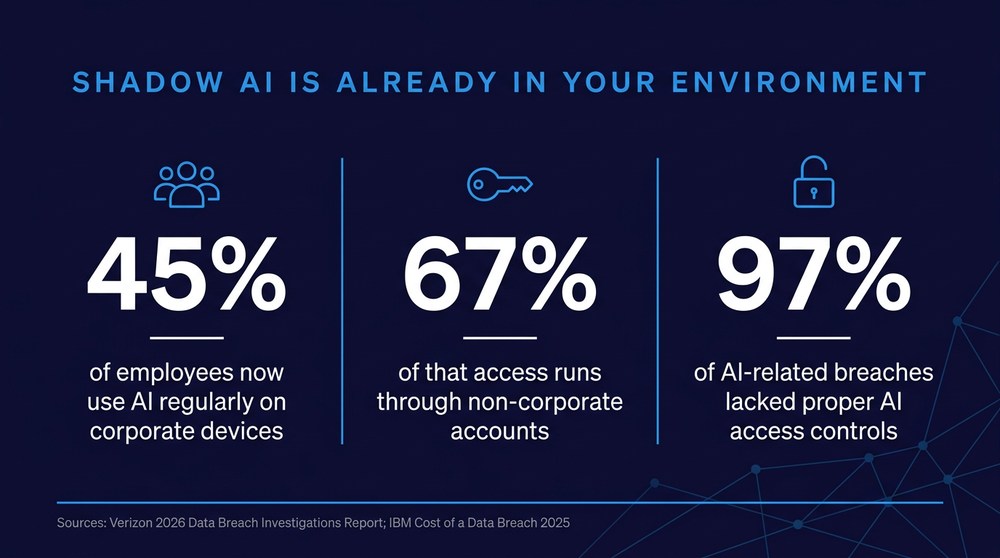
Verizon's 2026 Data Breach Investigations Report found that 45 percent of employees now use AI regularly on corporate devices, up from 15 percent the year before, and 67 percent of that access runs through non-corporate accounts.
IBM's 2025 Cost of a Data Breach Report found that 97 percent of organizations with an AI-related breach lacked proper AI access controls.
Licensing is the easiest decision in the project and should be the last one made.
Assess the environment first, then decide who gets a license and what the tool is allowed to see.
Most organizations are already running AI. They are just not running it on purpose. Verizon's 2026 Data Breach Investigations Report found that 45 percent of employees now use AI tools regularly on corporate devices, roughly triple the prior year, and that 67 percent of that access happens through non-corporate accounts no security team can monitor. Source code was the most common data type employees submitted to outside AI platforms.
For a manufacturer holding controlled unclassified information or a health system holding patient records, that is not a productivity story. It is an exposure story. Meanwhile the licensed, governable option sits in the Microsoft 365 admin center waiting on a decision. That gap between unofficial use and official readiness is the entire case for Microsoft Copilot consulting. The work is not flipping a switch. The work is making sure that when the switch is flipped, the assistant returns the right answers to the right people and nothing else.
What Does Microsoft Copilot Consulting Actually Prepare You For?
It prepares your data estate, your identity controls, and your users for a tool that can read everything a given employee is already permitted to read, instantly and conversationally. Copilot does not break permissions. It obeys them, which is a very different problem.
Consider what that obedience means in a tenant with history. Ten or fifteen years of SharePoint sites, Teams channels spun up for projects that ended in 2019, migrated file shares that carried their old access control lists along with them, and a handful of libraries somebody set to "everyone except external users" during a deadline crunch. None of that caused an incident, because finding the content required knowing it existed. Copilot removes that friction entirely.
The permission model becomes the AI boundary
Whatever governs access to your Microsoft 365 environment today becomes the guardrail for every Copilot response tomorrow. If group membership is stale, if departed employees still hold access through nested groups, if a finance library inherited broad permissions from a parent site, Copilot will surface that content to anyone who asks a reasonable question. Real Microsoft Copilot consulting starts by mapping that reality, not by scheduling a demo.
The problem predates the AI
This is worth saying plainly, because vendors rarely do. Access sprawl is not created by Copilot. It is exposed by Copilot. Organizations that treat readiness as an AI project usually miss the point and buy tooling to solve a housekeeping failure that better identity and access controls would have caught years ago.
Why Do Copilot Rollouts Expose Data Instead of Saving Time?
Because the controls that govern AI access were never built in the first place. IBM's 2025 Cost of a Data Breach Report found that 63 percent of studied organizations have no AI governance policy at all, and that among organizations reporting an AI-related breach, 97 percent lacked proper AI access controls. Breaches involving high levels of shadow AI added roughly 670,000 dollars to the average cost.
Run the arithmetic on your own tenant. Say you have 300 employees and one legacy SharePoint site holding compensation spreadsheets, an acquisition model, or a customer pricing matrix, set at some point to organization-wide access. Before Copilot, reaching that content required knowing the site existed, navigating to it, and opening the right file. After Copilot is enabled for all 300 users, reaching it requires knowing how to phrase a question. One misconfigured site multiplied by 300 licensed users produces 300 new paths to the same data, and not one of them generates a ticket for IT to review.
That is the mechanism behind nearly every "Copilot exposed our data" story. It is also completely preventable.
Enable first, govern later. What happens in week one: Fast rollout, visible enthusiasm. What happens in month six: Sensitive content surfaces in prompts, trust drops, adoption stalls.
Assess first, then enable. What happens in week one: Slower start, narrower pilot group. What happens in month six: Clean answers, defensible audit trail, expanding use.
No decision at all. What happens in week one: Nothing appears to change. What happens in month six: Employees route company data through personal AI accounts.
What Should a Copilot Readiness Assessment Cover?
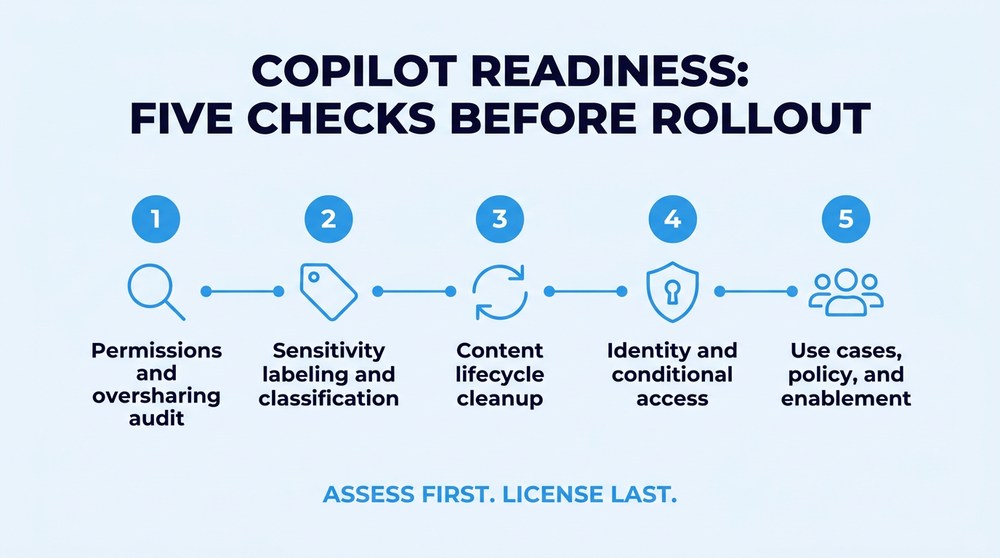
A credible copilot readiness assessment examines five areas before anyone discusses rollout timing. Skip any of them and you are guessing.
Permissions and oversharing audit. Identify every site, library, and Teams channel with broad or inherited access, then determine who actually needs it. Microsoft's own Copilot deployment guidance directs administrators to run oversharing reports, disable "everyone except external users" at the tenant level, and start access reviews on overshared sites before scaling.
Sensitivity labeling and classification. Copilot is designed to honor sensitivity labels and to carry the strictest label from source material into what it generates. That protection only functions if labels exist and are applied consistently, which for regulated data means real compliance-aligned data classification before the pilot rather than alongside it.
Content lifecycle cleanup. Stale sites, abandoned project libraries, and six versions of the same policy document do more than clutter search. They teach the assistant to cite outdated information confidently, which erodes user trust faster than any security concern.
Identity and conditional access. Multifactor authentication, conditional access policies scoped to Copilot-licensed users, and audit logging turned on for AI interactions. If you cannot answer who queried what and when, you have no governance, only hope.
Use cases, policy, and enablement. Pick two or three departments with defined workflows, write an acceptable use policy that covers approved and prohibited tools, and train people on both. NIST's AI Risk Management Framework organizes secure AI adoption into four functions: govern, map, measure, and manage. Most organizations skip straight to measure and wonder why nothing sticks.
What Does Microsoft Copilot Implementation Require Before Day One?
Microsoft's setup requirements are short: a qualifying Microsoft 365 base license such as E3, E5, Business Standard, or Business Premium, users on a supported update channel, Entra ID accounts with Exchange Online mailboxes, and administrative access to assign licenses. That list takes an afternoon. The list below takes considerably longer, and it determines whether Microsoft Copilot implementation succeeds or quietly gets switched off in month three.
Identity and conditional access. Who can invoke Copilot, and from where — unmanaged devices reach governed data.
SharePoint and OneDrive permissions. What Copilot can retrieve per user — confidential content surfaces in ordinary prompts.
Sensitivity labels and DLP. How generated content inherits protection — regulated data leaves its control boundary.
Content lifecycle. Which sources Copilot treats as current — confident answers built on obsolete documents.
Acceptable use policy and training. Where employees take work AI cannot do — shadow AI absorbs whatever Copilot cannot handle.
Microsoft AI consulting that treats licensing as the whole project never gets past the first layer. Note the last one especially. A licensed assistant does not eliminate personal AI accounts on its own. It removes the excuse, and only if people are told what is approved for what.
How Should Manufacturing and Healthcare Approach Microsoft Copilot Consulting Differently?
Both operate under obligations that make a careless rollout a regulatory event rather than an embarrassment. The data types differ, but the discipline behind secure AI adoption is the same: classify first, restrict second, enable third.
For manufacturers protecting CUI across Michigan and the Great Lakes region, the sharp edge is controlled unclassified information moving through the defense supply chain. Drawings, specifications, and quality records tied to CUI obligations carry handling requirements that do not disappear when an assistant summarizes them into a new document. Tenants that grew out of hurried on-premise migrations tend to hold that material in exactly the places least likely to have clean permissions.
Healthcare faces the mirror image. HIPAA's minimum necessary standard governs how much protected health information any workforce member should be able to reach, and a conversational interface makes overly generous access visible in a hurry. For healthcare IT environments, the useful test is simple: if a scheduler can ask a question and receive clinical detail their role never required, the access model failed long before AI arrived.

Frequently Asked Questions
Four questions come up in nearly every readiness conversation. The answers below assume a Microsoft-first environment and a reader who will have to defend the decision to a board, an auditor, or a customer.
Do you need Microsoft 365 E5 to use Copilot?
No. Copilot requires a qualifying base license such as Microsoft 365 E3, E5, Business Standard, or Business Premium, plus the Copilot license itself. E5 brings additional security and compliance capabilities that make governance easier, but license tier is not what determines whether your environment is ready.
Can Copilot access data an employee is not supposed to see?
Copilot only retrieves what the signed-in user already has permission to open. The risk is that permissions in most tenants are far more generous than anyone intends, so "already has permission" covers considerably more ground than leadership assumes.
How long does a copilot readiness assessment take?
It depends on tenant age, how many file shares were migrated, and how much classification work exists already. An organization with clean labeling and recent access reviews moves quickly. One with fifteen years of accumulated SharePoint sprawl should expect remediation to be the longest phase, and should plan a phased pilot rather than a tenant-wide launch.
Does deploying Copilot solve shadow AI?
Partially. A sanctioned, governed tool removes the main reason employees reach for personal accounts, but only when paired with a clear acceptable use policy, monitoring of AI traffic, and training. Microsoft Copilot consulting that stops at deployment leaves the unsanctioned half of the problem untouched.
Decide What Copilot Can See Before You Decide Who Gets It
Secure AI adoption is not a technology decision. It is a sequence decision, and most organizations run the sequence backward. Getting that order right is what serious Microsoft Copilot consulting is for.
Centaris is an IT and cybersecurity partner supporting manufacturers, healthcare organizations, and other regulated businesses across Michigan and the Great Lakes region. Our Copilot readiness work starts where the risk actually lives: assessment of identity, permissions, data classification, and licensing before anyone builds a rollout plan. We will show you what Copilot would surface in your environment today, what needs remediation first, and what a governed, phased adoption looks like on your timeline. You decide what gets fixed and in what order. Schedule a no-obligation assessment and find out what your tenant would tell an AI assistant on day one.