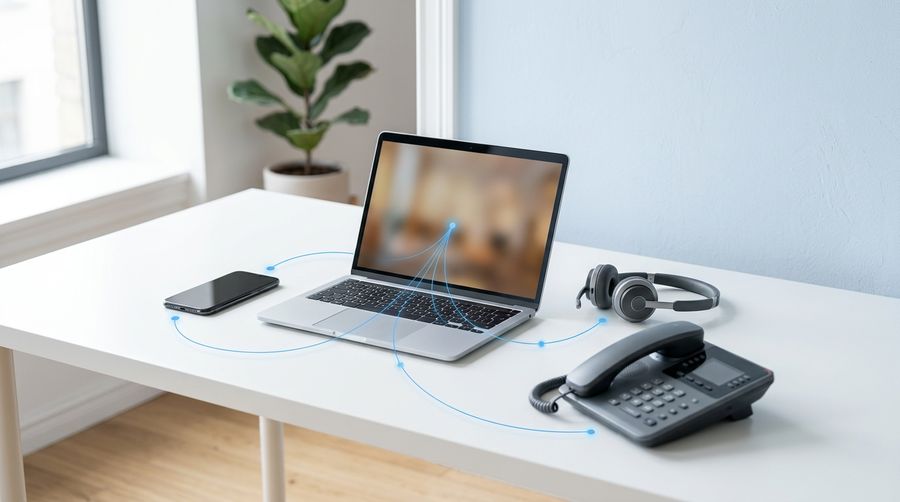
The traditional business phone system is being retired, and the replacement is already on most employees' screens.
Microsoft Teams Phone turns Teams into a full cloud phone system, so calls, chat, meetings, and collaboration run in one place instead of across separate vendors.
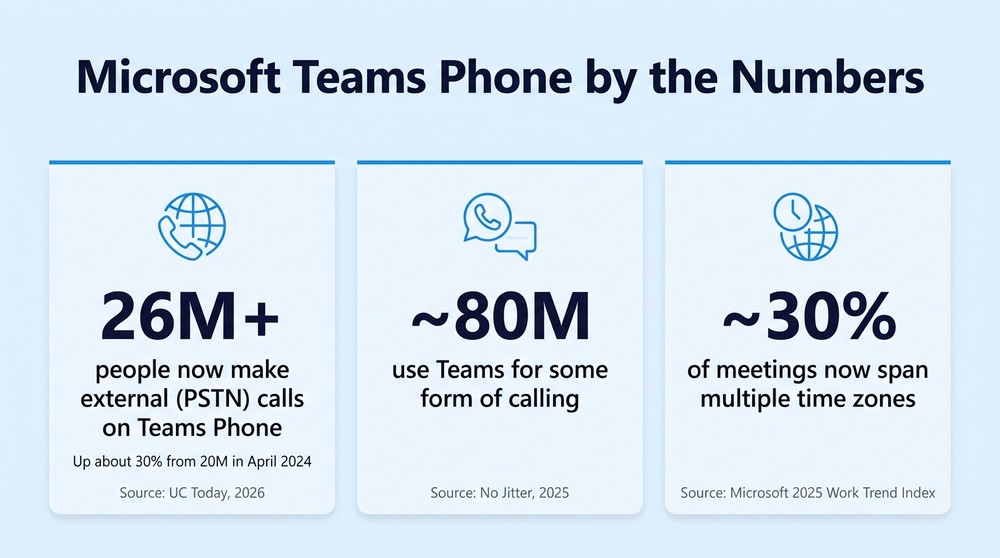
Adoption is accelerating fast. Teams Phone passed 26 million PSTN calling users in late 2025, up roughly 30 percent from 20 million in April 2024, according to UC Today.
Hybrid and multi-site work exposed the old model. A desk phone bolted to one location does not fit a workforce that moves between plants, clinics, home offices, and the road.
The hard part is not the technology. It is the plan. Licensing, number porting, call flows, and compliance all have to line up before you cut over.
If your carrier contract, your conferencing tool, and your collaboration platform are three different bills, you are paying for a problem Teams was built to solve.
Most organizations did not decide to keep two communication systems. It happened by default. Email, chat, files, and meetings moved into Microsoft 365 years ago, while the phone system stayed exactly where it was: a box in a closet, a carrier contract that renews on autopilot, and a vendor you call only when something breaks. That split made sense when everyone sat at the same desk every day. It stopped making sense the moment your workforce spread across sites and schedules.
That is the shift driving Microsoft voice solutions into the center of the conversation. Microsoft Teams Phone lets an organization make and receive external calls directly inside Teams, using the same identity, the same app, and the same admin controls that already govern chat and meetings. Momentum backs it up: Teams Phone crossed 26 million PSTN calling users by the end of 2025, a roughly 30 percent jump from 20 million in April 2024, per UC Today's reporting. The question for most Great Lakes businesses is no longer whether voice belongs in Teams. It is how to get there without breaking anything that matters.
What Is Microsoft Teams Phone, and Why Now?
Teams Phone is a cloud-based phone system built into Teams, and it provides the calling features a traditional PBX delivered: dial tone, hold, transfer, voicemail, call queues, and auto attendants. Microsoft describes it as full private branch exchange capability delivered from the cloud, with a separate connection to the public phone network for outside calls, according to Microsoft's Teams documentation. In practice, that means the handset on the desk becomes optional. A laptop, a mobile device, or a certified desk phone all handle Teams calling the same way, because the phone number follows the person, not the location.
The timing is not an accident. On-premise phone hardware ages out, support contracts lapse, and the cost of keeping a physical PBX alive climbs while its value drops. Meanwhile the collaboration platform sitting next to it kept adding capability. Consolidating the two removes an entire category of infrastructure, and the scale of the shift is already visible: Microsoft reports roughly 80 million people using Teams for some form of calling across internal and external calls, as analyst coverage on No Jitter notes. Voice is no longer a separate product bolted onto Microsoft 365.
How Does Teams Phone Reach the Outside World?
Getting Teams to talk to the regular phone network is where planning starts, because there is more than one way to do it. Microsoft supports several connection methods, and the right one depends on your carrier relationships, your locations, and your regulatory needs. Choosing well up front prevents an expensive redo later.
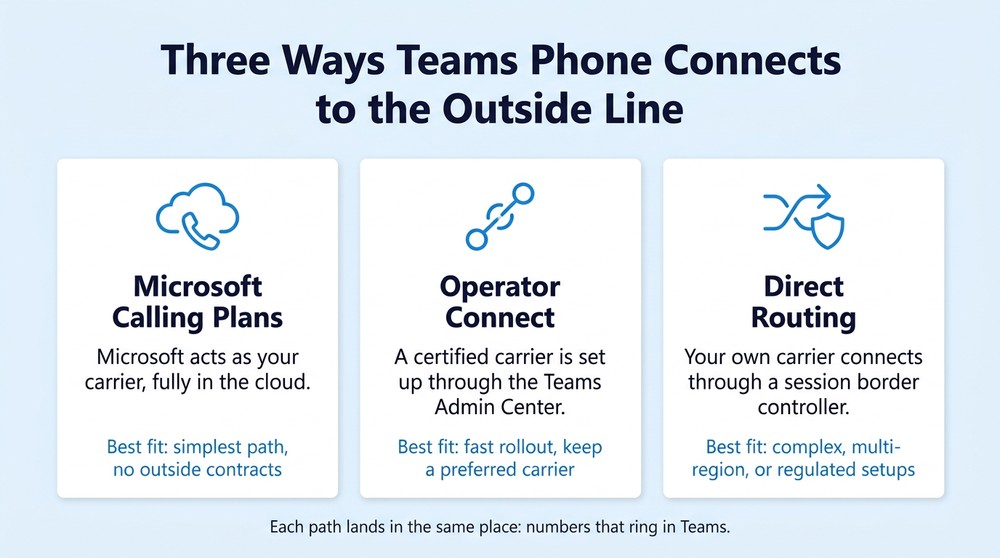
Three connection methods cover most deployments:
Microsoft Calling Plans. Microsoft acts as your phone carrier, entirely in the cloud. It is the simplest path, and it fits organizations that want no external carrier contracts.
Operator Connect. A certified carrier is provisioned through the Teams Admin Center. It suits a fast rollout, keeping a preferred carrier, and centralized management.
Direct Routing. Your own carrier connects through a session border controller. It fits complex, multi-region, or regulated setups and legacy integrations.
Each path lands in the same place: numbers that ring in Teams. The difference is who carries the call and how much control you keep over routing, compliance, and cost. Whichever path you choose, day to day Teams Phone management happens in one console, the Teams Admin Center.
What Does Moving Voice Into Teams Actually Change?
It changes how reachable your people are, and it collapses your vendor sprawl. When calling lives inside Teams, a distributed workforce reaches the same extension whether the person is on a plant floor, in a clinic, or working from home. Microsoft's 2025 Work Trend Index found that roughly 30 percent of meetings now span multiple time zones, based on Microsoft's research. A phone system anchored to one building cannot serve that reality. One built into the tool people already live in can.
The second change is financial and operational. Consider a 150-person manufacturer running a separate PBX at each of two plants, a standalone conferencing tool, and its own carrier contract. That is four vendor relationships, four renewal cycles, and four support numbers for one function: talking to people. Fold voice into the platform employees already use, and three of those relationships can collapse into one. That consolidation also simplifies co-managed IT support, since there is one environment to govern instead of several.

5 Signs Your Traditional Phone System Is Holding You Back
Some organizations wait for the PBX to fail before they act. The warning signs usually show up long before that.
Your phone system and your collaboration tools live in two different places. Calls happen in one app, everything else happens in Teams, and the two never share context.
Remote and hybrid staff route work calls through personal cell phones. The business loses the number, the call records, and any control over how customers are handled.
Every move, add, or change requires a vendor ticket and a wait. Onboarding a new hire should not depend on a third party's queue.
Your PBX hardware is approaching end of life or end of support. A refresh cycle is the natural moment to ask whether the hardware should exist at all.
Call data never reaches the systems where you make decisions. Volume, wait times, and follow-up actions stay trapped in a system no one else can see.
If three or more of these sound familiar, the phone system is no longer neutral. It is actively costing you speed, visibility, or both.
How Should You Plan a Microsoft Teams Phone Migration?
Start by understanding what you have before you buy anything, because a voice migration touches more than dial tone. It touches numbers, call flows, emergency calling, analog lines, and the way customers reach you today. The organizations that struggle treat it as a simple swap. The ones that succeed map the current state first, then move deliberately. That assess-first discipline is the difference between a clean cutover and a week of dropped calls.
The comparison below shows why the destination is worth the effort, and where the real work sits:
Where it lives. A traditional PBX runs on on-premise hardware or a hosted box; Teams Phone runs in the cloud, inside Microsoft 365.
Remote and hybrid access. The old model is limited and often tied to a desk; Teams Phone rings the same number on a laptop, mobile, or desk phone.
Moves, adds, and changes. A PBX needs a vendor ticket and a wait; Teams Phone changes are managed in the Teams Admin Center.
Maintenance. A PBX means hardware refreshes and support contracts; Teams Phone maintenance is rolled into the platform.
Voice plus collaboration. A PBX keeps them as separate systems; Teams Phone puts calls, chat, and meetings in one app.
Reporting and AI. PBX reporting is siloed or unavailable; Teams Phone offers native call data and Copilot-assisted follow-up.
What to Confirm Before You Cut Over
A few items decide whether the migration is smooth or painful, and they are easy to overlook. Confirm that every existing number can be ported, and build a realistic timeline for it, because porting is carrier-dependent and rarely instant. Validate emergency calling and any analog lines that still run fax machines, paging, or door systems, since those do not migrate themselves.
Finally, pin down licensing early: Teams Phone requires a phone system license plus a chosen way to connect to the outside network, and getting that combination right the first time avoids paying for the wrong thing. Handled well, a migration is also a chance to tighten identity and access security across the whole Microsoft environment, not only the phones.
What Do Michigan Manufacturers and Healthcare Teams Need to Watch?
Regulated industries carry requirements a generic rollout will miss, and voice is squarely in scope. In healthcare, any recording, voicemail, or call handling that touches patient information falls under HIPAA, which means retention, access, and encryption all have to be designed in, not added later. Manufacturers in defense and automotive supply chains face their own frameworks, and communications data is not exempt. Moving voice into Teams can actually strengthen this posture, because the calls now sit inside the same governed Microsoft 365 tenant as everything else, under one set of compliance-aligned controls.
The regional angle matters too. A cloud phone system does not remove the need for someone who can show up when a plant loses connectivity or a clinic needs hands on site during a cutover. That combination, cloud-native voice with local presence, is where a nearby partner who will walk your facility beats a remote provider working a ticket queue three states away. Technology consolidates. Accountability should not.

Microsoft Teams Phone FAQ
Is Microsoft Teams Phone a full replacement for a business phone system?
Yes. A Teams Phone system provides the core capabilities a traditional PBX delivered, including external calling, voicemail, transfers, call queues, and auto attendants, all managed from the cloud. Most organizations retire their old system entirely rather than run both.
Do you need special licensing for Teams Phone?
Yes. Teams Phone requires a phone system license plus a method to connect to the public phone network, such as a Microsoft Calling Plan, Operator Connect, or Direct Routing. The right mix depends on your carriers and locations, so confirm it before you commit.
Can you keep your existing phone numbers?
In most cases, yes. Numbers are ported from your current carrier into Teams. Porting timelines vary by carrier and region, so it should be scheduled early in any migration rather than assumed.
What happens to your desk phones?
You have options. Certified Teams desk phones work natively, employees can use the Teams app on a laptop or mobile device, and shared devices cover common areas. Many organizations reduce handset counts, because the app handles most calling.
Is Teams Phone secure enough for regulated industries?
It runs on Microsoft's enterprise security architecture and supports compliance recording, retention, and access controls. As with any regulated deployment, the safeguards have to be configured correctly for HIPAA, CMMC, or similar frameworks, which is where experienced setup matters most.
Make Teams Your Phone System, the Right Way
Retiring a phone system is not a hardware swap. It is a change to how your entire organization reaches customers, coordinates internally, and stays compliant, and it deserves a partner who has done it in environments like yours.
Centaris is an IT and cybersecurity partner serving manufacturing, healthcare, and other regulated organizations across the Great Lakes, with deep Microsoft expertise spanning licensing, deployment, voice services, ongoing management, and support. That means Teams Phone is handled end to end: the connection method chosen to fit your carriers, numbers ported without dropped calls, regulatory requirements factored into the design, and a real team nearby when you need someone on site.
If your phone system is aging, your bills are scattered across vendors, or your hybrid workforce is quietly running calls through personal phones, the fix is closer than you think. See how Teams Phone deployment and management can consolidate your communications, then schedule a no-obligation assessment to map your current setup and build a migration plan that fits your organization.