The phone system is usually the last thing a business evaluates and the first thing that quietly starts costing it money.
Choosing between a Microsoft Teams Phone system and a traditional business phone system is a decision about operating model, not about dial tone.
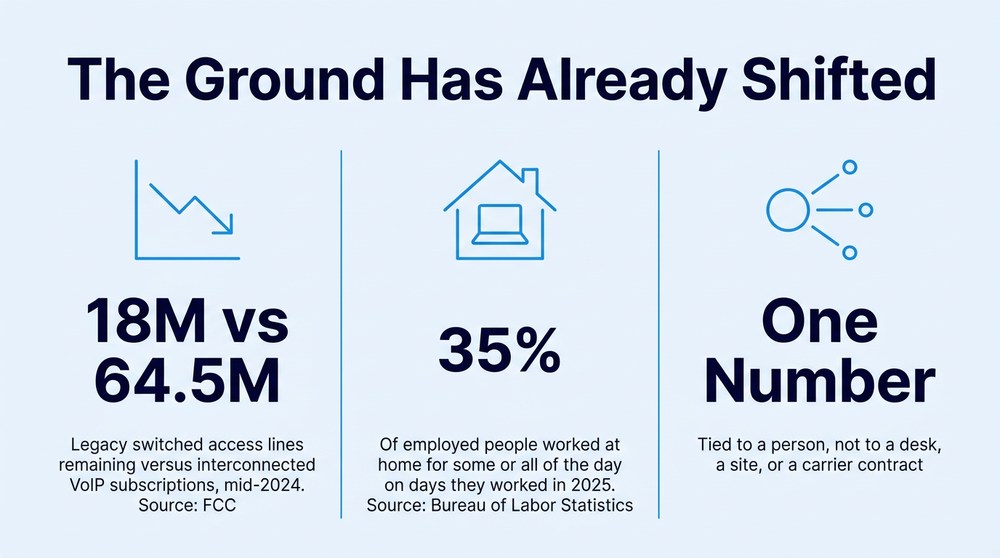
Legacy voice is already the minority. By mid-2024 roughly 18 million switched access lines remained in the United States, against 64.5 million interconnected VoIP subscriptions, according to the Federal Communications Commission.
The real cost gap lives in administration. Hardware refreshes, carrier tickets, and per-site maintenance consume more staff hours than the monthly invoice suggests.
Distributed work broke the desk phone model. In 2025, 35 percent of employed people did some or all of their work at home on days they worked, per the Bureau of Labor Statistics.
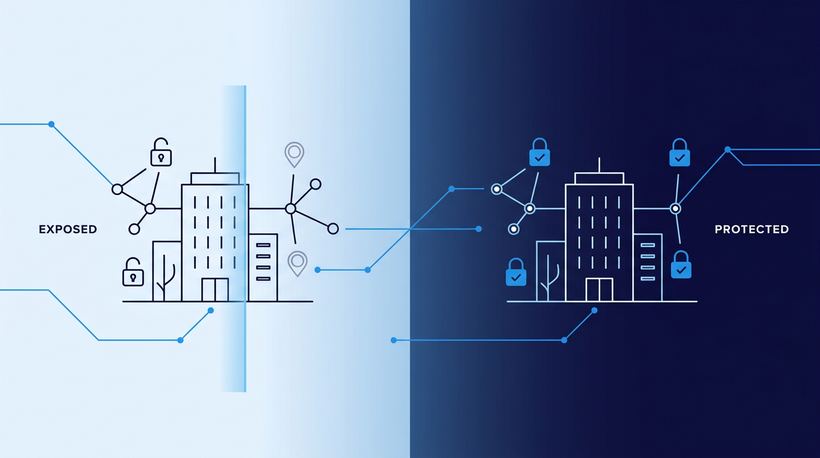
Voice becomes an identity system when it moves to the cloud. That is an advantage when identity controls are strong and an exposure when they are not.
If nobody at your organization can explain how a call reaches a plant supervisor after hours, the phone system is not the only thing that needs a look.
Most organizations did not choose to run two communication platforms. It happened by attrition. Email, chat, files, and meetings migrated into Microsoft 365 years ago, while voice stayed behind: a controller in a closet, a carrier contract that renews on autopilot, and a vendor who gets called only when something breaks. That arrangement worked when everyone sat at the same desk five days a week. It stopped working the moment your workforce spread across plants, clinics, home offices, and trucks.
The market has already moved. The FCC noted in its 2025 network modernization proceeding that reliance on legacy switched lines has fallen to roughly 18 million nationally, compared with 64.5 million interconnected VoIP subscriptions as of mid-2024. Carriers are retiring copper, not investing in it. So the question facing most Great Lakes businesses is no longer whether to leave a legacy PBX behind. It is whether a Microsoft Teams Phone system is the right landing spot, or whether a standalone cloud phone system serves you better.
What Is a Microsoft Teams Phone System, and How Does It Differ From a Traditional Setup?
A Microsoft Teams Phone system turns Teams into the call control layer for your organization. Phone numbers, auto attendants, call queues, voicemail, and call routing all live inside Microsoft 365 and are managed through the Teams admin center. Users make and receive external calls from the same app they already use for chat and meetings, on a laptop, a mobile device, a headset, or a compatible desk phone.
A traditional business phone system separates those functions. Call control sits on premises or in a carrier's cloud, user identity lives in your directory, and the two are stitched together by whoever installed them. Every change touches two systems and often two vendors.
The connection to the outside world is where evaluation-stage buyers usually get stuck. Microsoft supports three routes to the public telephone network, and Microsoft's documentation on PSTN connectivity confirms they can be mixed inside a single tenant.
Microsoft Calling Plans. Microsoft acts as the carrier — simplest path, single vendor, no session border controller to run.
Operator Connect. A participating carrier, provisioned inside the Teams admin center — keeping an existing carrier relationship without managing hardware.
Direct Routing. Your own carrier through a certified session border controller — complex routing, analog devices, legacy PBX interoperability, multi-site control.
This matters because a VoIP replacement project is rarely all or nothing. A manufacturer with paging systems, elevator lines, and a legacy PBX at one plant can run Direct Routing there while the rest of the business uses Calling Plans. That flexibility is the whole argument for handling Microsoft voice and collaboration as one integrated design rather than a forklift swap.
What Does the Cost Comparison Actually Look Like?
The comparison usually turns on administration rather than the monthly invoice. A traditional business phone system carries costs that never appear on a bill: the controller replaced at end of life, the maintenance contract renewed out of habit, the per-site carrier circuit, the truck roll for a move, and the internal hours spent coordinating all of it.
Run the arithmetic. Consider a 250-person manufacturer with three locations. Suppose the team processes 25 phone changes a month: new hires, departures, extension moves, routing adjustments. If each one takes 40 minutes of ticket writing, vendor follow-up, and verification, that is roughly 17 hours a month and more than 200 hours a year spent moving phone numbers around. Those figures are illustrative, not a benchmark. Pull your own ticket queue and count before you sign another renewal.
A cloud phone system changes the shape of the spend rather than simply lowering it. Capital expense becomes an operating subscription tied to user count, which is easier to forecast. It also means a business that over-licenses gets no refund for the seats nobody uses, which is why a license audit belongs at the front of an evaluation, not the end.
How Do Administration and User Experience Compare?
Administration is where the two models diverge most sharply. In Teams, a phone number is an attribute of a user identity in Microsoft Entra ID. Add the user, assign the license, assign the number, and the person can take calls anywhere they can sign in. In a traditional setup, the phone is an attribute of a location, and the person is expected to be standing next to it.
That difference cascades into everything else. Call queues and auto attendants can be reconfigured by an internal administrator in minutes instead of submitting a request and waiting. Reporting on call volume, missed calls, and queue performance draws from the same admin surface as the rest of Microsoft 365. And the user experience collapses from three interfaces into one, which cuts training time and reduces the number of tools employees quietly ignore.
Where calling lives. Traditional: Dedicated PBX or carrier platform. Teams Phone: Inside Microsoft 365, tied to user identity.
Adding or moving a user. Traditional: Vendor ticket, often per site. Teams Phone: Assign a license and number in the admin center.
Remote and mobile access. Traditional: Forwarding rules or a separate softphone. Teams Phone: Same app and number on any signed-in device.
Cost model. Traditional: Hardware, maintenance contracts, per-site circuits. Teams Phone: Per-user subscription plus chosen connectivity method.
Security and logging. Traditional: Managed separately from identity. Teams Phone: Governed by the same identity and access policy as email.
Multi-site consistency. Traditional: Each site configured independently. Teams Phone: One tenant, one dial plan, one policy set.
The honest caveat: Teams voice inherits whatever identity hygiene, network design, and licensing discipline already exist. Organizations without internal capacity for that often close the gap with co-managed IT support rather than adding headcount.

What Tells You It Is Time to Replace a Legacy PBX?
Most companies wait for a failure. The warning signs usually show up years earlier.
Your carrier has notified you about copper or TDM service changes. Once retirement notices start arriving, the timeline is no longer yours to set.
Employees give out their cell numbers instead of extensions. When the official system is inconvenient, people route around it, and the business loses visibility into customer conversations.
A simple change takes a week. If moving an extension requires a vendor ticket and a scheduled visit, administration is costing more than the service.
Each site does it differently. Separate systems across multi-site manufacturing operations mean separate failure modes, separate contracts, and no consistent reporting.
Nobody can say who owns the phone system. If the answer is a former employee or a vendor account manager, that gap is the finding.
What Changes for Remote and Multi-Site Work?
Everything about reachability changes. The Bureau of Labor Statistics reported that in 2025, 35 percent of employed people worked at home for some or all of the day on days they worked. A phone system tied to a physical desk is designed for a workforce that no longer exists in that form.
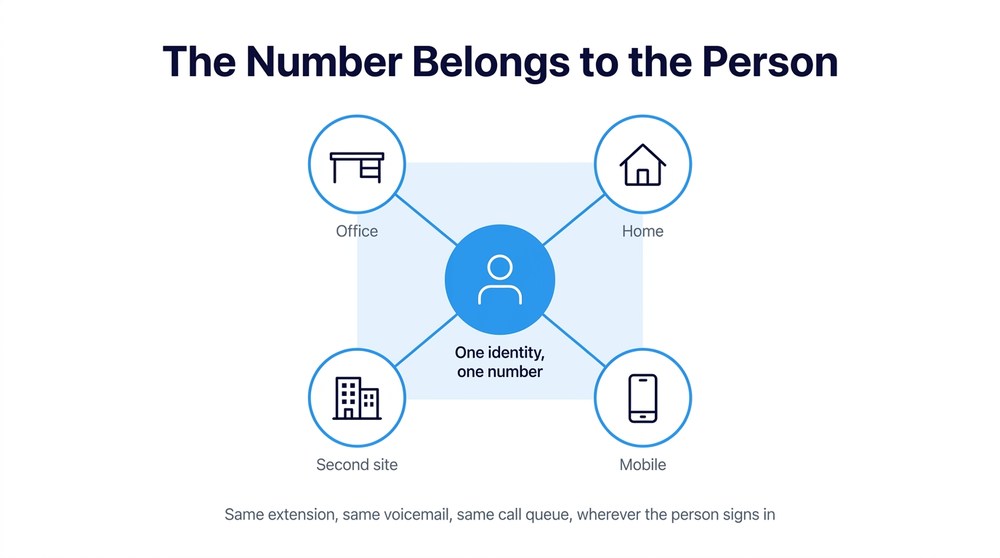
A Microsoft Teams Phone system ties the number to the person rather than the place. One number follows an employee across office, home, mobile, or a second facility. Call queues can span sites, so a customer calling the Grand Rapids number reaches whoever is available rather than whoever happens to be seated. For healthcare organizations, the same logic governs after-hours and on-call routing, which is usually held together today by a forwarding chain nobody has audited in three years. For lean support teams covering a four-hour drive radius, that consistency is often worth more than any per-user savings.
When Is a Microsoft Teams Phone System the Wrong Answer?
It is the wrong answer when the environment underneath is not ready. Three situations deserve honesty before anyone signs anything.
The first is identity. Moving calling into Microsoft 365 places voice under the same authentication perimeter as email and files, which is a security gain only if conditional access, multifactor enforcement, and privileged account controls are already sound. Consider how attackers actually operate: a joint FBI and HHS advisory on social engineering against the health sector documented threat actors calling IT help desks while posing as employees to trigger password resets and take over accounts. A unified platform concentrates value, so identity and access controls and help desk verification procedures need to be validated first, not assumed.
The second is network readiness. Voice quality on a plant floor or in a clinic depends on wireless coverage, quality of service configuration, and internet redundancy at each site. Those are solvable, but they are project work, not a checkbox.
The third is regulated obligations. Emergency calling rules require accurate dispatchable location information for multi-line systems, which gets complicated fast across a multi-building campus. Healthcare and defense supply chain organizations also carry documentation requirements that a migration has to account for. None of that disqualifies Teams voice. It means the design has to reflect the regulatory environment rather than discover it afterward.

Frequently Asked Questions
Do you have to replace every desk phone?
No. Certified handsets, common area phones, and conference devices are supported, and analog endpoints such as paging or elevator lines can be retained through Direct Routing with a session border controller. Most organizations keep phones in shared spaces and move knowledge workers to headsets.
Can you keep your current carrier as well as your numbers?
Yes on both counts. Numbers port, and Operator Connect or Direct Routing allow you to retain a carrier relationship rather than buying calling from Microsoft. Porting timelines depend on the losing carrier, so build slack into the schedule.
How long does a migration usually take?
For a mid-sized organization, plan a VoIP replacement in weeks rather than days. Discovery, license alignment, network validation, call flow design, number porting, and a pilot group all precede cutover. The technical work is rarely the constraint. Porting and call flow decisions are.
Is call quality reliable in a plant or clinic environment?
It is, when the network is designed for it. Wireless coverage in production areas, quality of service policies, and redundant internet at each site are the variables that determine the outcome. Assess those before committing to a date.
Get a Straight Answer About Your Voice Environment
A phone system decision made on price alone tends to surface its real cost about eight months later, usually during an outage or an audit. The better sequence is to understand what you have, where it is exposed, and what your Microsoft environment can actually support before anyone quotes you a per-user figure.
Centaris is an IT and cybersecurity partner working with manufacturers, healthcare organizations, and other regulated businesses across Michigan and the Great Lakes region. Our team handles Microsoft licensing, voice services, deployment, and ongoing Teams Phone management as one integrated engagement, and we start by assessing what is in place rather than selling you a stack. Schedule a no-obligation assessment and get an honest read on what a move to Teams voice would actually involve.