
A Microsoft 365 security assessment measures real exposure across identity, data, devices, and connected apps, not whether Microsoft’s recommended toggles happen to be switched on.
Secure Score rates configuration hygiene against Microsoft’s own recommendations. It does not know your risk profile, your regulatory obligations, or how far one stolen password could travel.
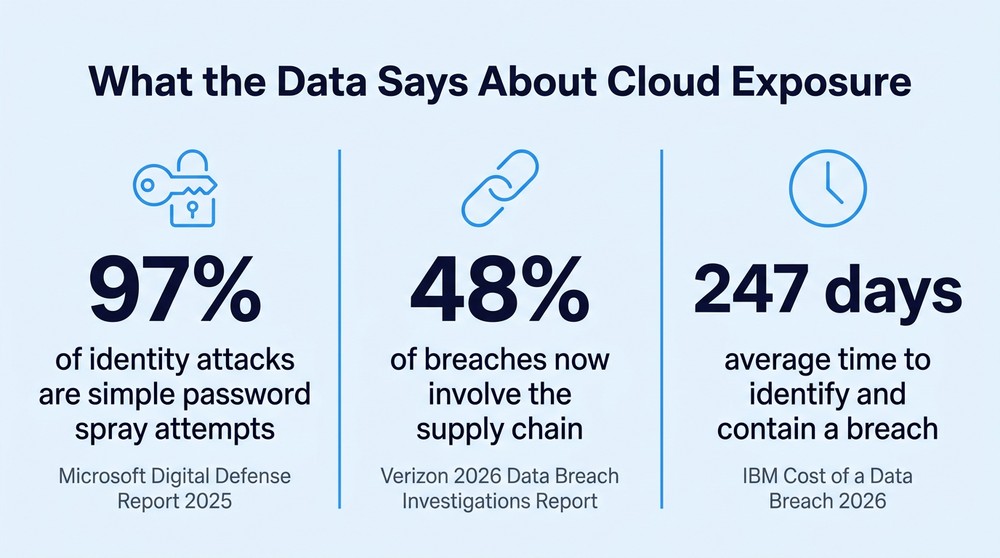
Identity remains the front door, and Microsoft reports that 97% of identity attacks are simple password spray attempts.
The attack surface now includes things nobody formally approved: OAuth app consents, vendor integrations, and unsanctioned AI tools.
The average breach takes longer to identify and contain than Microsoft 365 keeps audit logs by default, which means the evidence expires mid-incident.
If you cannot name the last person who reviewed your conditional access policies and enterprise app consents, the assessment is already overdue.
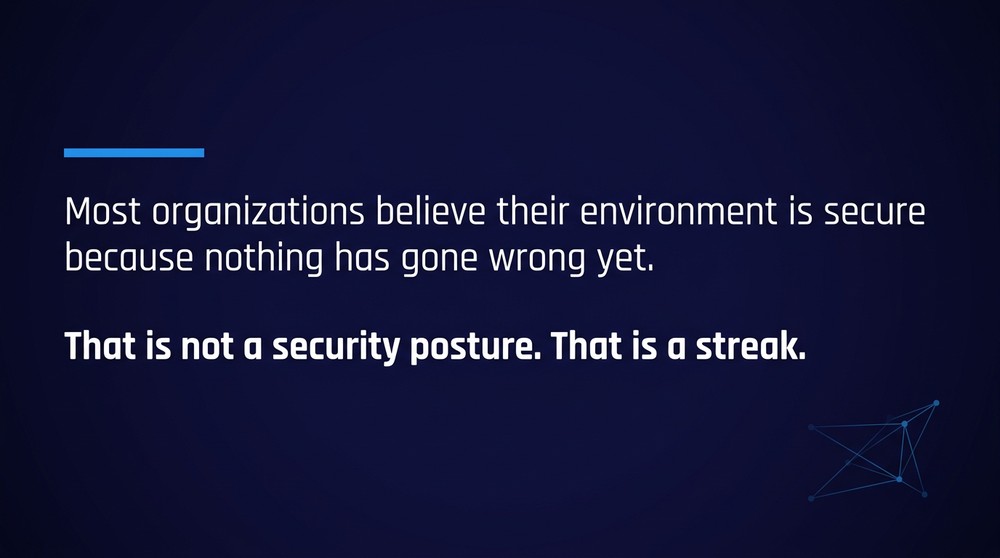
Most organizations running Microsoft 365 believe their environment is secure because nothing has gone wrong yet. That is not a security posture. That is a streak.
A Microsoft 365 security assessment asks a harder question: if one set of credentials were stolen this afternoon, how far could someone get before anyone noticed? Microsoft’s own documentation is unusually candid on this point, stating that Secure Score reflects the extent to which you are using available security controls and should not be read as a measurement of breach likelihood. A number in a dashboard is not an answer to the question above. Knowing which accounts, files, and systems are reachable from a single compromised login is.
What Does a Microsoft 365 Security Assessment Actually Examine?
A thorough Microsoft 365 security assessment reviews five connected layers: identity, data, devices, connected applications, and email. Each layer is examined against how the environment is actually used, not against a generic checklist, because the same setting can be prudent in one organization and reckless in another.
The findings are rarely exotic. In most tenants, the problems are ordinary decisions that were correct at the time and never revisited. A break-glass admin account exempted from MFA during a migration. A SharePoint sharing link created for a 2021 vendor project, still live, still anonymous. The value of the review is that someone finally looks.
Identity (Entra ID). What gets examined: MFA coverage, conditional access, legacy authentication, privileged role assignment. What usually turns up: Admin accounts exempted “temporarily,” standing global admin rights.
Data (Purview, SharePoint, OneDrive). What gets examined: Sharing defaults, sensitivity labels, retention, audit configuration. What usually turns up: Anonymous links with no expiry, oversharing that AI tools then surface.
Devices (Intune, Defender). What gets examined: Enrollment, compliance policies, patching, endpoint protection. What usually turns up: Unmanaged personal devices with full mailbox access.
Applications. What gets examined: OAuth consents, enterprise apps, service principals, API permissions. What usually turns up: A third-party app granted mailbox read access years ago.
Email (Defender for Office 365). What gets examined: Anti-phishing policy, impersonation protection, forwarding rules. What usually turns up: External auto-forward rules nobody created on purpose.
That application row deserves more attention than it usually gets. Verizon’s 2026 Data Breach Investigations Report found that supply chain breaches jumped 60% and now account for 48% of breaches, with compromised vendor accounts and excessive cloud permissions doing much of the damage. Your Microsoft Teams and SharePoint environments are only as trustworthy as the integrations quietly authenticating into them.
Why Is Secure Score Not the Same as an Assessment?
Secure Score tells you how closely your configuration matches Microsoft’s recommendations for the licenses you own. An assessment tells you what an attacker could do inside your specific business. A Microsoft security assessment that stops at Secure Score is a status report, not a risk review, and only one of those holds up in front of an auditor.
The distinction matters because Secure Score is scoped to Microsoft’s view of your tenant. It has no opinion about the manufacturing execution system on your plant floor, the vendor with standing access to your file shares, or whether your cyber insurance application described controls you do not actually have.
Which recommended actions are incomplete. Which gaps matter given your industry and data
Your configuration against a Microsoft baseline. Your exposure against real attacker behavior
Points available in your license tier. Capabilities you already pay for and have not enabled
Progress over time. Blast radius from one compromised account
Nothing about regulatory frameworks. Where you stand against CMMC, HIPAA, TISAX, or CJIS evidence requirements
There is a useful public benchmark that goes further than Secure Score. CISA’s Secure Cloud Business Applications project publishes secure configuration baselines for Microsoft 365 along with ScubaGear, a no-cost tool that checks tenant configuration against them. The baselines were written for federal agencies, and CISA has made them available to private sector organizations as well. Running them is not the whole job, but it is a considerably sharper instrument than a score.
Microsoft 365 security is a configuration question before it is a purchasing question. Baselines and scores are inputs to a decision about layered security controls, and deciding which layers your organization actually needs is the part no tool performs for you.
5 Signs You Need a Microsoft 365 Security Assessment Now
Nobody can name the owner of conditional access. If patching, identity policy, and app approval have no named owner today, they have no owner at all. Shared responsibility between an internal team and an outside provider usually means the gaps live in the seam, which is exactly why co-managed IT support arrangements need explicit boundaries in writing.
Your license entitlements outrun your configuration. Plenty of organizations pay for Business Premium or E3 and still buy separate email filtering, endpoint protection, and device management. Paying twice is the visible cost. The invisible one is that the unconfigured native tooling is where your logging and enforcement would have come from.
AI showed up before governance did. Verizon’s 2026 report found employee use of unapproved AI tools tripled, reaching 45%. If Copilot was switched on before anyone audited SharePoint permissions, Copilot is now a very efficient way for an employee to discover documents they were never supposed to see. Secure adoption is a permissions problem before it is a policy problem.
Your last review was a migration, not an assessment. Cutover checklists optimize for working mailboxes and happy users. They do not evaluate risk, and the settings chosen to make a migration go smoothly are frequently the ones an attacker appreciates most.
An auditor, insurer, or customer is about to ask. For a Michigan manufacturer in a defense supply chain or a regional health system, the question arrives on a deadline. Finding out what you cannot prove during compliance readiness work is survivable. Finding out during an audit is not.
What Does Waiting Actually Cost?
Here is the arithmetic most leadership teams have never run.
IBM reports that it now takes an average of 247 days to identify and contain a breach. Microsoft Purview Audit (Standard), the tier included with most non-E5 licensing, retains audit records for 180 days, and that window cannot be extended natively.
247 days of incident. 180 days of logs. If your breach follows the average, your own audit trail starts deleting itself roughly two months before the incident is closed, and the records that go first are the oldest ones: the initial sign-in, the consent grant, the first forwarding rule. Your responders reconstruct the attack from wreckage instead of evidence.
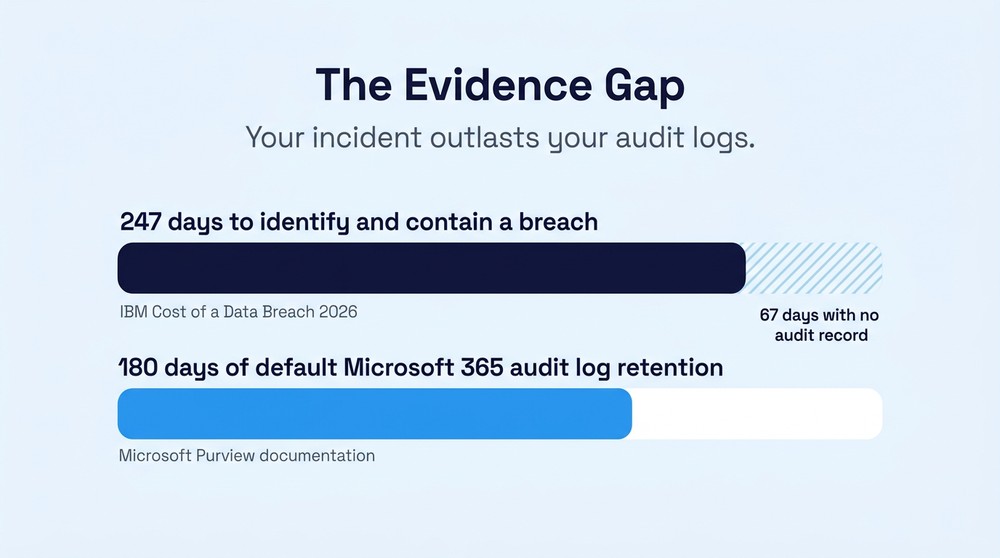
For an owner or CEO, that is the whole decision in one line. The choice is not between spending on security and leaving it alone. It is between finding the gap on a Tuesday with a report in hand, or finding it during an incident with your insurer, your largest customer, and possibly a regulator all asking the same question at once.
The fix is unglamorous: export audit data on a schedule or stream it to a SIEM, then verify that it is actually landing. It is also the kind of finding that only surfaces when somebody examines the environment before an incident rather than during one.
What Should Be Ready Before the Assessment Starts?
Have three things prepared: an accurate inventory, the right access, and honest answers.
The inventory means every tenant, every domain, every service account, and every vendor with standing access. Organizations that have grown through acquisition routinely discover a second tenant nobody has logged into for two years. Access means read-level permissions for a reviewer, which frequently requires untangling who holds global admin and why so many people do.
The honest answers matter most. Assessments fail when someone describes the environment as designed rather than as it runs. If MFA was rolled out with a dozen exceptions, say so. If the ERP vendor insists on a shared account with a password from 2019, say that too. Identity remains the pressure point: Microsoft’s 2025 Digital Defense Report found that 97% of identity attacks are password spray attempts, the crudest technique available. Attackers are not defeating sophisticated controls. They are finding the accounts where the controls were never applied.
Regulated operations should add framework evidence to the pile, because it changes what the assessment needs to produce. A supplier in the manufacturing supply chain preparing for CMMC needs scope boundaries defined before anyone starts collecting artifacts. In a clinical environment, the parallel questions are whether the ePHI living in SharePoint, OneDrive, and Teams chat is actually covered by your HIPAA risk analysis, and whether you could produce access logs for it on request. Both are Security Rule expectations. Both are tenant configuration problems long before they are policy problems.
Frequently Asked Questions
Does a Microsoft 365 security assessment make an organization compliant?
No. An assessment identifies gaps and produces a prioritized remediation plan. Formal certification under frameworks like CMMC or TISAX is granted by accredited third parties following a separate audit. Any provider claiming to certify you is describing something that does not exist.
Is Microsoft Secure Score enough on its own?
No. Secure Score is a useful improvement roadmap for configuration hygiene, and Microsoft states plainly that it is not a measurement of breach likelihood. It does not evaluate human risk, third-party access, or regulatory evidence requirements.
Is a Microsoft 365 security assessment worth it with only Business Premium licensing?
Usually more so. Business Premium includes Entra ID P1, Intune, and Defender for Business, and those capabilities routinely sit dormant in tenants that were stood up quickly. Assessments of smaller environments often find the organization already owns most of what it needs.
How often should a Microsoft 365 security assessment be repeated?
Annually at minimum, and after any material change: an acquisition, a new line-of-business application, an AI deployment, a change in IT staffing, or a new compliance obligation. Configuration drifts quietly, and Microsoft adds recommended actions over time.
See What Your Tenant Is Actually Exposing
Everything above is diagnosable. The reason it often goes undiagnosed is that the organizations most exposed are the ones whose provider monitors the environment without ever examining it.
Centaris is an IT and cybersecurity partner serving manufacturers, healthcare organizations, and other regulated businesses across Michigan and the Great Lakes region, with deep Microsoft expertise and a cybersecurity team that stays engaged from assessment through response. A good review starts with evaluation rather than procurement: understand the real exposure, show you where you stand, then decide together what to address, whether that runs as a fully managed or co-managed engagement.
Schedule a no-obligation assessment and find out what your Microsoft 365 environment looks like from the outside.